Calendar Application Redesign

Project Overview   |   Previous Calendar   |   UX Research   |   Mid-Fidelity Wireframe   |   Finished Web Application   |   Takeaways

Client

Revize.

Product

Web Application

Role

UX/UI Designer

Time

Mar 4 2024 - Mar 18, 2024

Project Overview

A Modern Way to Organize Events

This calendar application is used by municipalities nationwide to digitally highlight community events. As we serve a variety of communities, the events can range from council meetings to city parades, and even small gatherings at public libraries. I took on the challenge of modernizing this application to enhance the way municipalities engage with their users.

Goals

  • Modernizing the user interface.
  • Design the interface to be fully ADA compliant.
  • Improve the usability for users visiting and staff managing the application.

Challenges

  • Make sure the new application fits the style and needs of multiple types of communities.
  • Appeal to new clients while not ignoring the preferences of existing clients.
  • Maintain a deadline of 2 weeks while redesigning 7 other applications simultaneously.

My Role

  • Sole UI/UX Designer on the project.
  • Create wireframes and an interactive prototype.
  • Conduct user interviews to understand client thoughts and experiences.

Previous Calendar

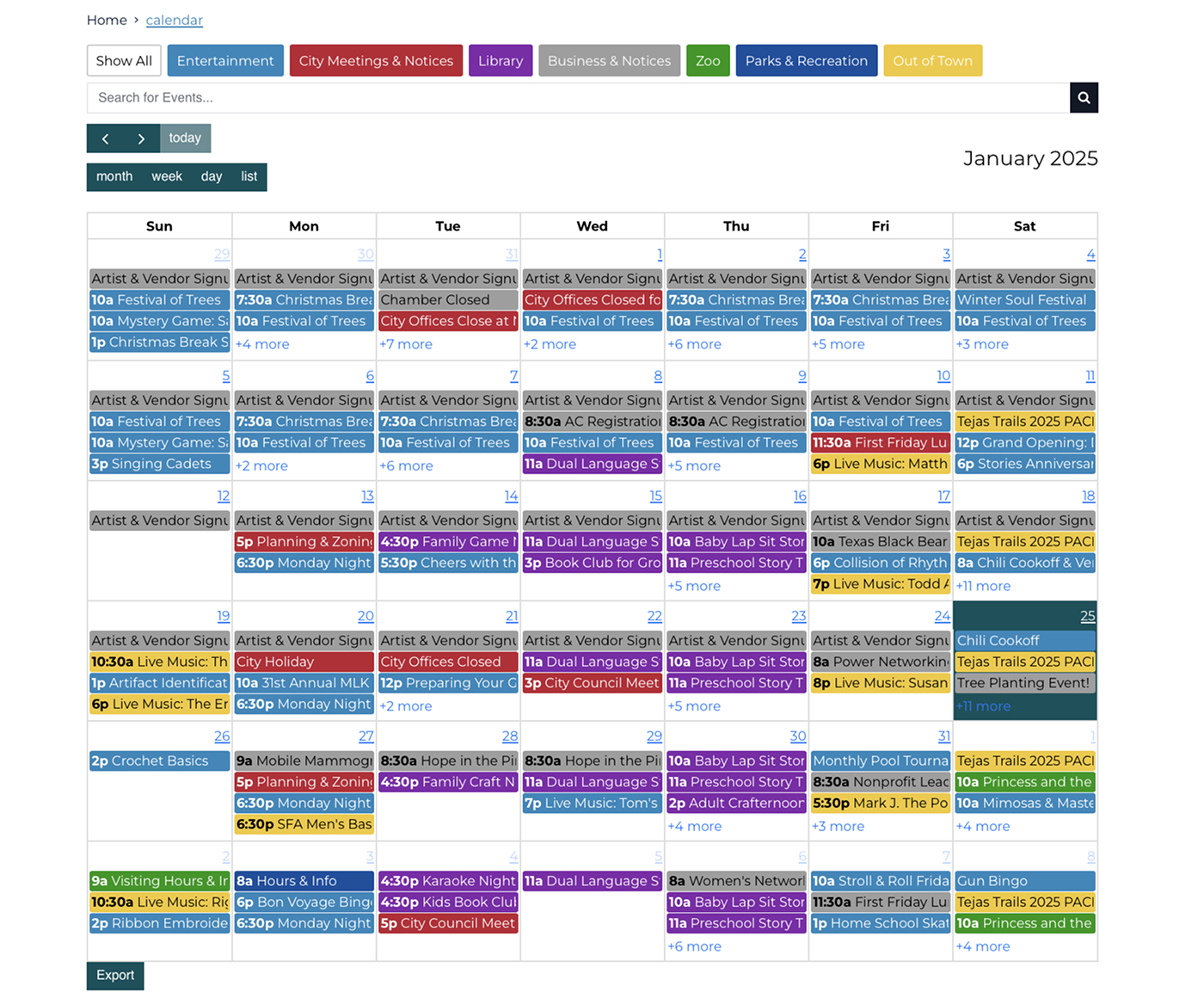
Old Calendar Application

Walkthrough of the Old Calendar

The old UI has a standard calendar layout, where municipalities populate it with community events.

Users can filter through events by clicking color-coded category buttons at the top, switch between different calendar views (month, week, day, or list), and access event information via pop-up by clicking on individual events.

Pain Points and Limitations

  • The events lacked sufficient color contrast for users with visual impairments, making navigation a challenge.
  • The category list became cluttered when municipalities added many options, reducing usability.
  • Municipalities had limited ways to customize the UI to align with website colors, resulting in a less cohesive experience.
  • Interactive elements lacked motion or feedback, making the interface feel static and less engaging for users.
  • The design felt dated and didn't meet modern expectations for a clean, functional, and visually appealing interface.

UX Research

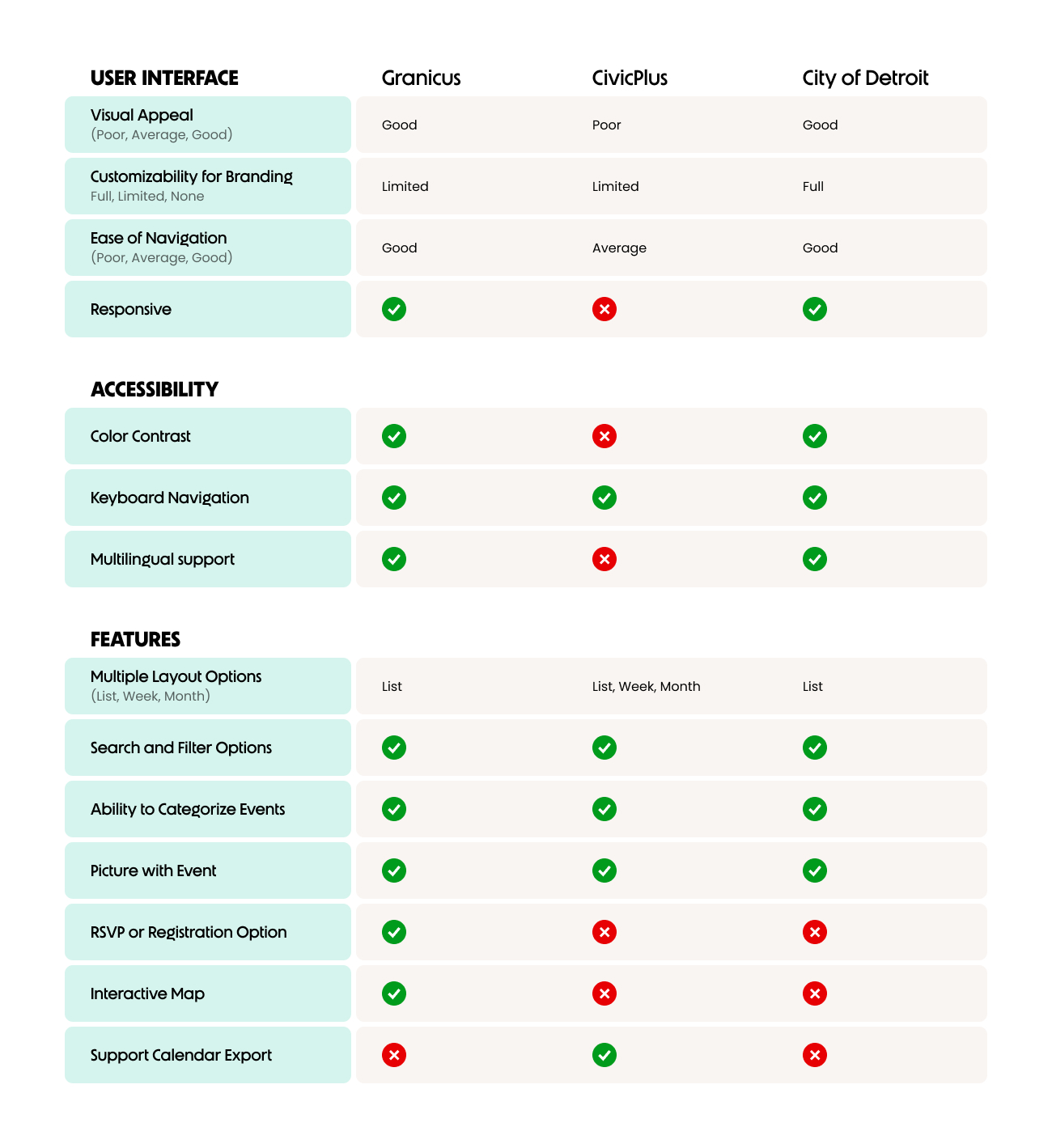
Competitive Analysis

I conducted a competitive analysis to review other similar web experiences, focusing on a few questions:

  • How do they appeal to different types of communities?
  • What sort of features do they have in their calendar apps?
  • Do they have different layouts for their calendars?
  • Is there anything they do different from the competition that sets them apart?

Insights

  • User Interface: Granicus and Detroit excel in visual appeal and navigation, while CivicPlus falls behind in responsiveness and accessibility. Custom branding options are limited across most platforms.
  • Accessibility: Multilingual support is often overlooked, with CivicPlus lacking key accessibility features like color contrast and keyboard navigation.
  • Features: Granicus leads with event imagery and RSVP options, but interactive maps and calendar export functionalities are underutilized across the board.
Competitive Analysis

User Interviews

The interview portion was a quick but useful step in our research. I met virtually with 5 of our clients that represented various types of municipalities. Below are the questions asked and key takeaways.

Do you have any frustrations about our current calendar application?

  • The majority of participants appreciated the layout of the app, but the UI looks outdated, specifically in regards to color compliance.
  • One participant expressed frustration with the requirement to include a photo for every event. In the current application, a default image is automatically added to events without a custom photo, which they found unnecessary.

What type of events do you most commonly add to the calendar, and what type of content do you need space for?

  • Every participant identified meetings being the most common type of event. Location, date/time, and the ability to link the meeting agenda were the most important pieces of content.
  • Community gatherings were the second most popular event. Location, date/time, picture, and a description were all mentioned as helpful to have.

How well do you feel the calendar application matches the design for the rest of your website? Is this important to you?

  • This sparked the discussion for 2 separate participants about how their website design is fantastic, but the design of all our applications specifically feel like a sharp downgrade.
  • In addition to the downgraded design, participants reported enjoying the ability to have a unique color for each category.

What new features would be most helpful for your community?

  • All participants said the current content available covers all their needs. Specifically, they enjoyed how selecting an event opens a pop-up rather than a new page.

Ranking Calendar Features

To simplify the wire framing stages, I wanted to understand which features I have available and how important they are for our target audience. This helped set a standard for which content to incoorporate.

A separate consideration was the time developers could allocate for this project. I was given permission to 'go wild' with the design and features, but also understood we had many internal projects happening and to design within reason.

Ranked Features

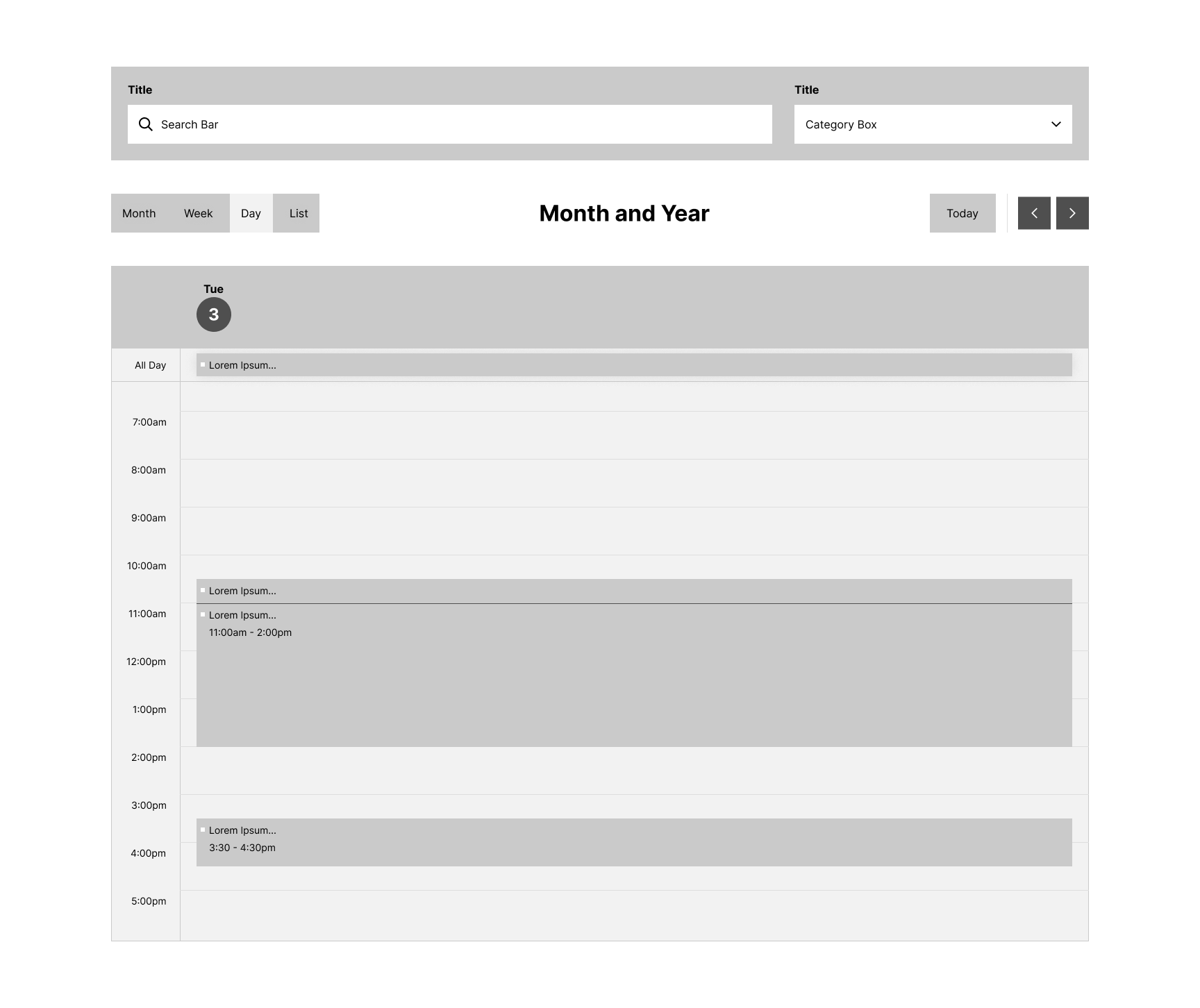
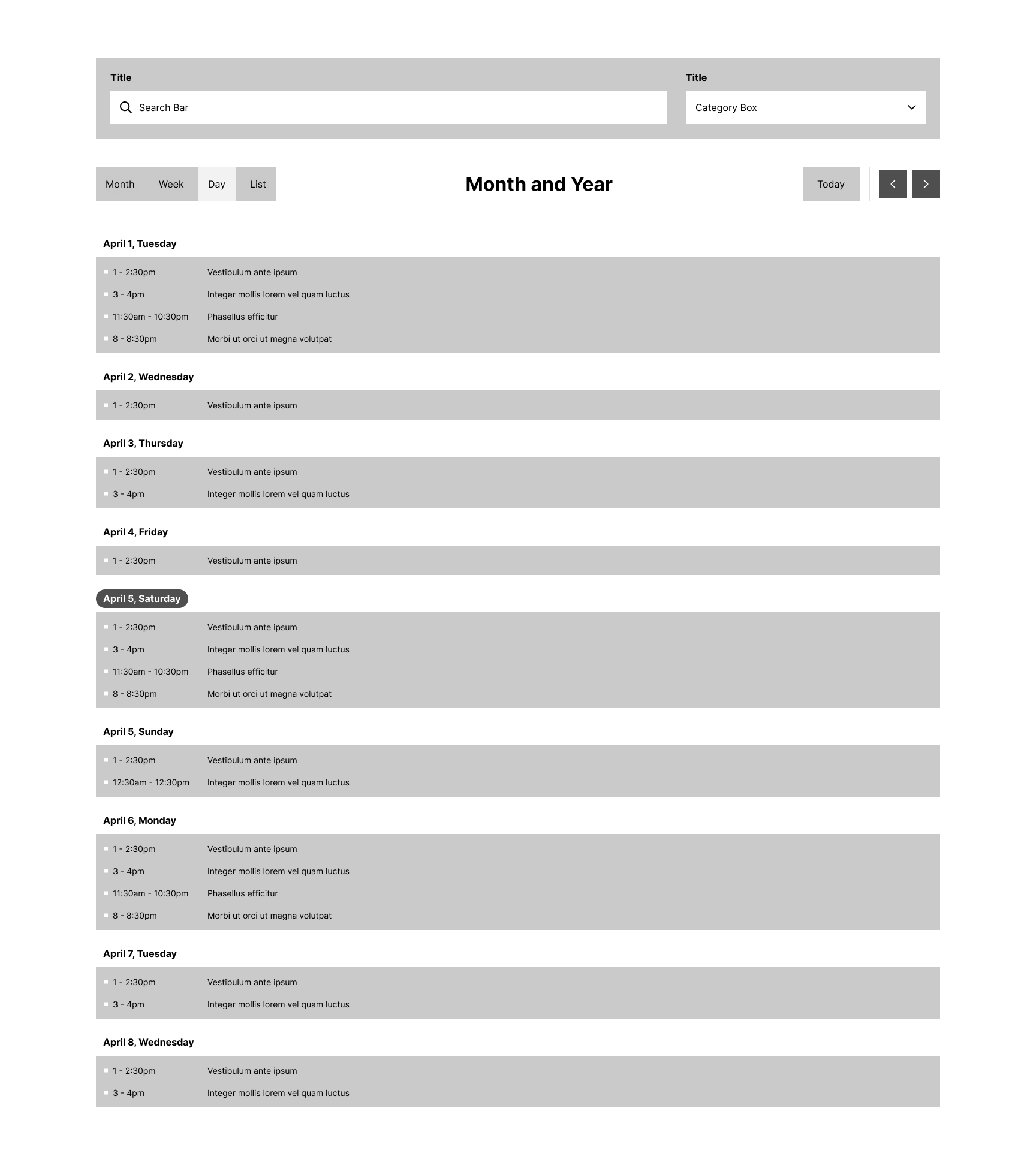
Mid-Fidelity Wireframe

During stakeholder discussions and user interviews, it became clear that a complete overhaul of the application was unnecessary. The feedback from clients learned towards satisfaction with the calendar's core functionality, which let us shift our focus to refining the user experience. From this point, our main goal was to enhance the UI and optimize content placement to improve usability without changing what already works well.

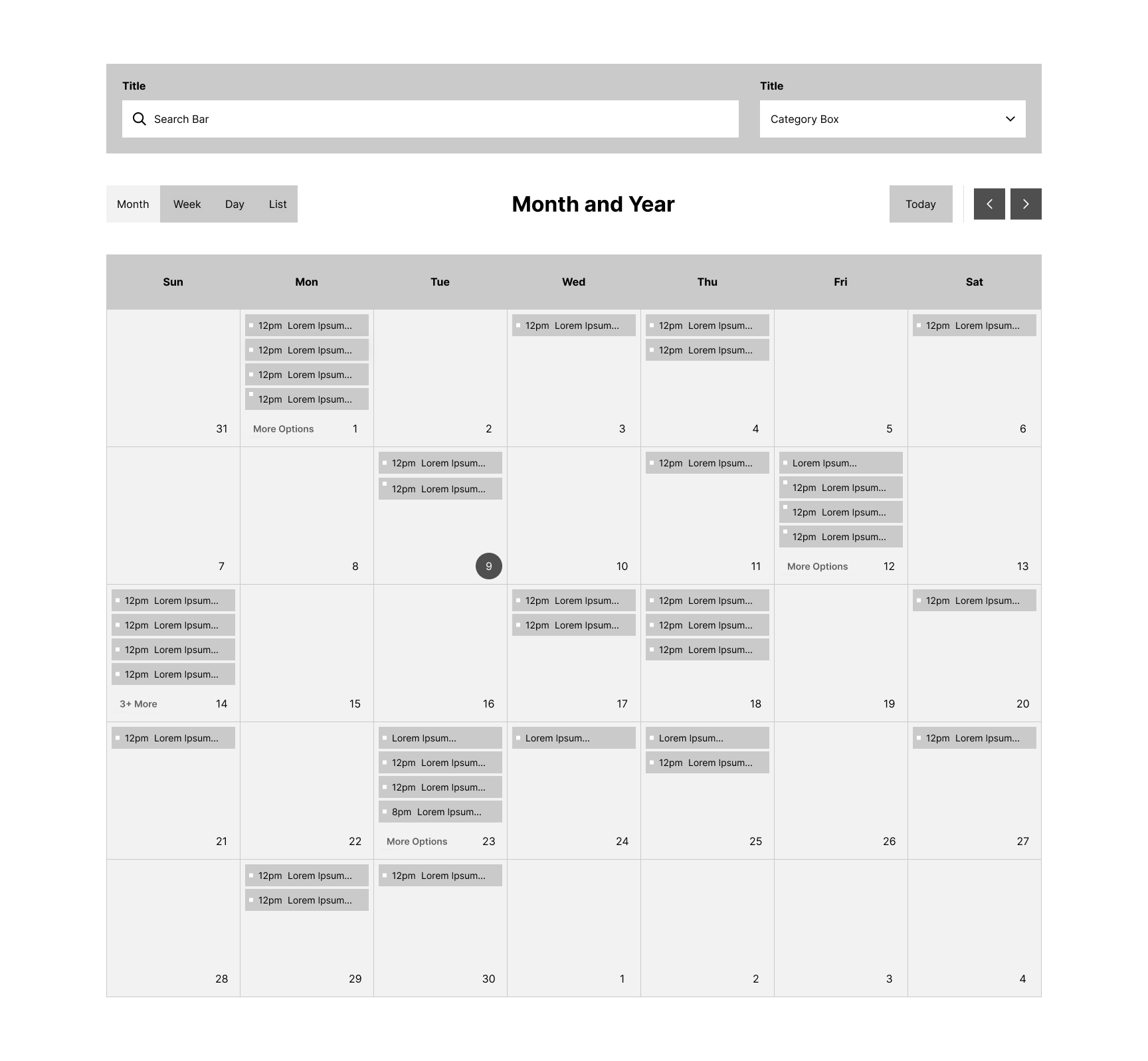
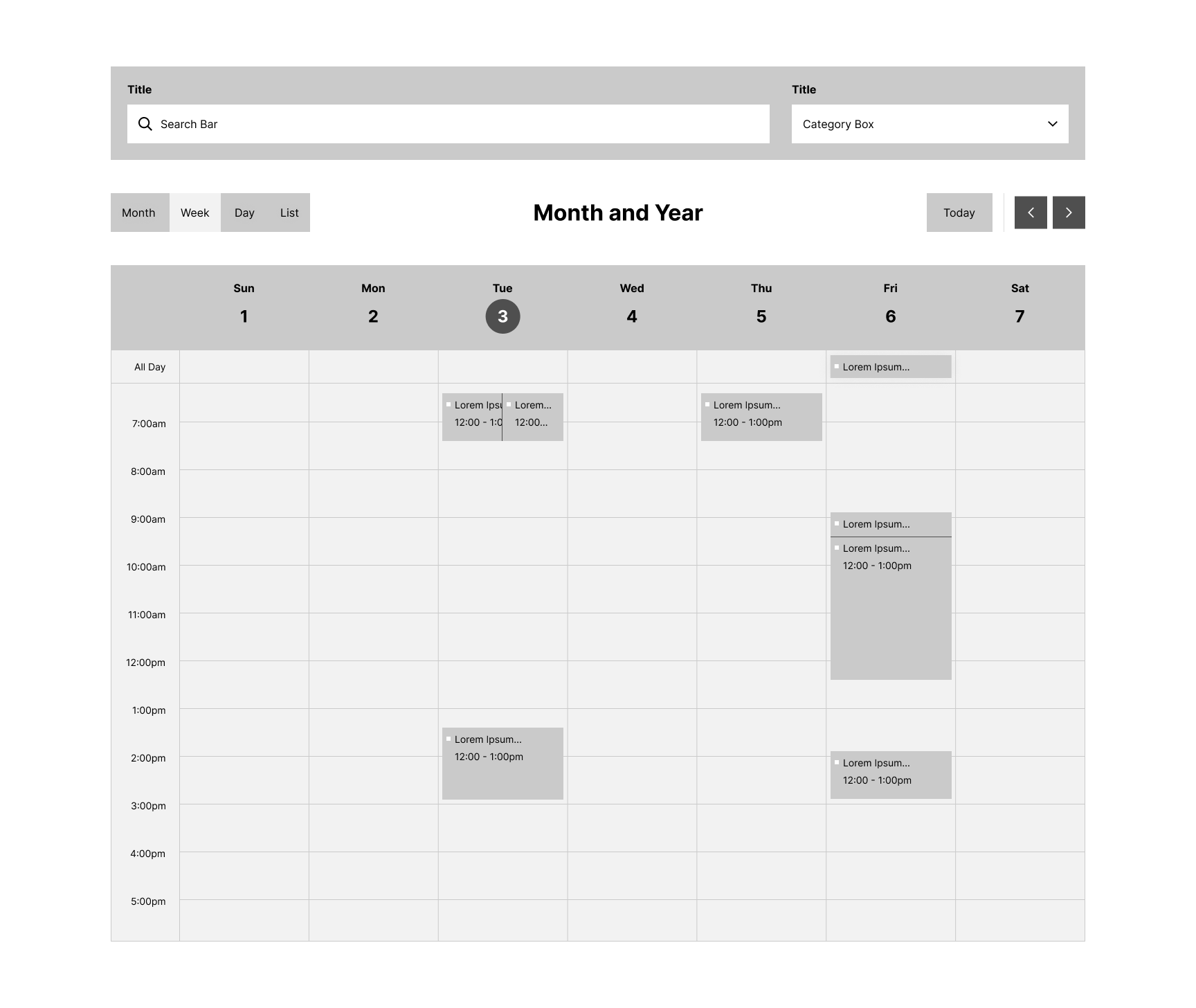
This wireframe serves as a starting point for reorganizing the calendar's layout. It offers the flexibility to make adjustments, allowing for easy tweaks to add, remove, or update elements before progressing to the final designs.

Month View

Mid-Fidelity Wireframe of Month View

Week View

Mid-Fidelity Wireframe of Week View

Day View

Mid-Fidelity Wireframe of Day View

List View

Mid-Fidelity Wireframe of List View

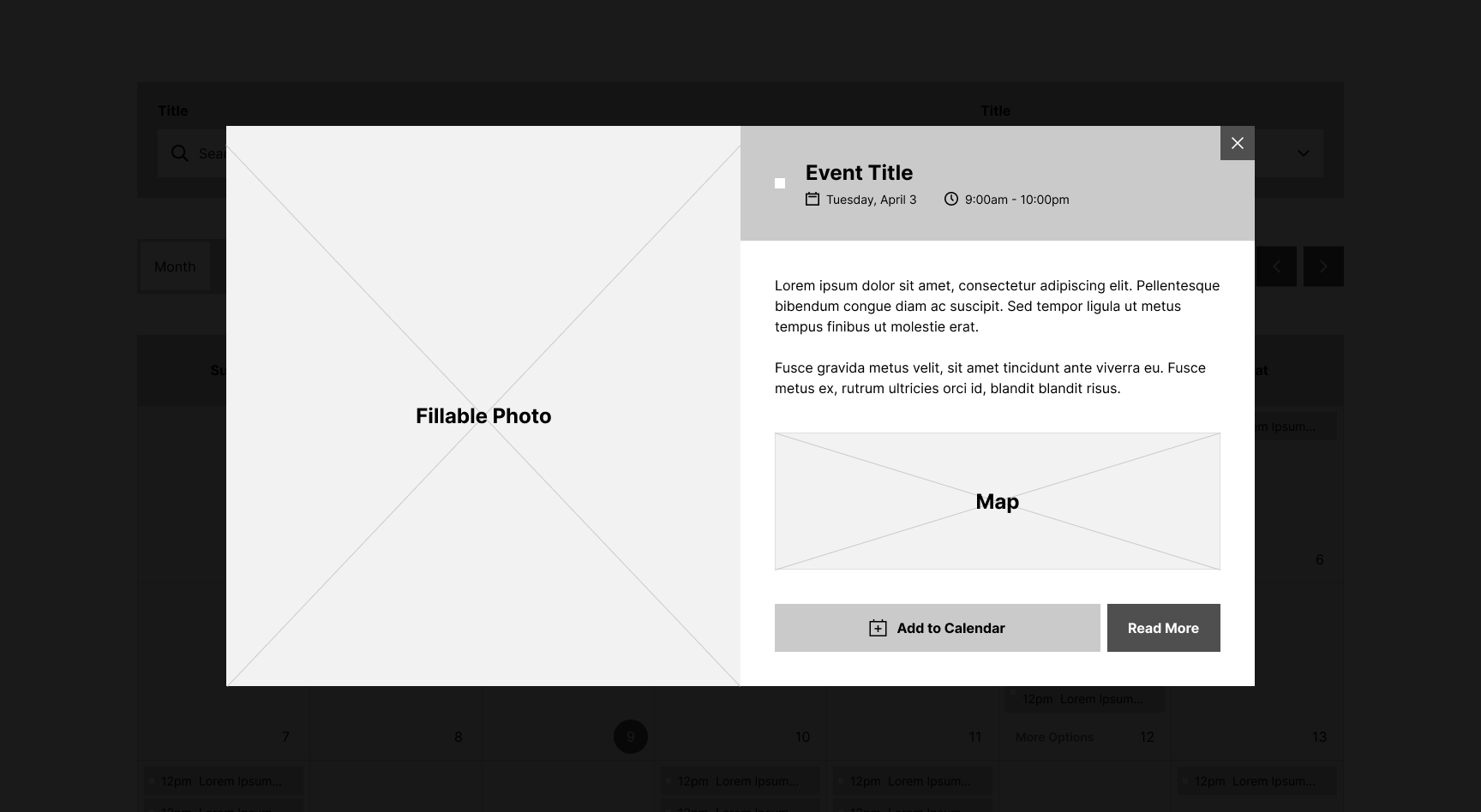
Pop-Up

Mid-Fidelity Wireframe of the event pop-up

High-Fidelity Wireframe

This is where it all comes together! The mid-fidelity wireframe was well received by stakeholders, so I moved onto adding the UI and prototyping. My goal was for all the elements to be intractable, properly displaying the hover effects and actions that users would experience.

UI Components

The visual language of the calendar application is meant to be clean, minimal, and organized. This lets it reasonably blend into most websites. The grayscale color scheme lets the content breath and provide emphasis towards the brand colors.

When creating the prototype, my goal was for all the elements to be interactible, properly displaying the hover effects and actions that users would experience.

While I unfortunately didn't have the time to conduct user testing to verify these updates, the prototype provided a good showcase for stakeholders and developers to understand the flow and interactions of the application.

Calendar Style Guide

UI Enhancements and Updates

  • The top section features a search bar and categories in a dropdown menu, letting communities stay organized with more options.
  • All calendar app interactions now include subtle motion effects or color changes with a 3:1 contrast ratio, addressing ADA compliance and accessibility needs.
  • Category colors are now shown on the left of event tabs instead of as backgrounds, staying noticeable while reducing ADA issues.
  • The event pop-up image is now on the left, creating more space for content and allowing clients to omit the image if desired.
  • A primary website color is now apart of the UI, improving branding consistency while minimizing developer customization time.

Takeaways

Lessons Learned

  • Properly utilizing Figma components can vastly improve consistency throughout a mockup and save time when making adjustments.
  • The importance of defining any time, development, and budget constraints at the beginning of a project.
  • A competitive analysis can be a strong way to discover new features worth implementing and provide potential design inspiration.

What Would I do Different?

  • Use website analytics to understand the popularity of resources and user pain points, which we could build off of to guide decision making. This unfortunately wasn't an option for this project due to time and technology constraints.
  • Conduct A/B testing to compare how users react to the old and new interfaces. Due to time constraints, this step wasn't an option.

Hard & Soft Skills

  • Figma (Prototyping, Components, and Styles)
  • User Research
  • UX/UI Design
  • Accessibility Standards
  • Project Management
  • Attention to Detail
  • Stakeholder Discussions

Credit: Thank you to Zeta Fonts for allowing me to use their beautiful font, Unigeo, on my personal website.